About Me

My photo
Spofford, New Hampshire, United States
Jeff Newcomer had been a physician practicing in New Hampshire and Vermont for over 30 years. Over that time, as a member of the Conservation Commission in his home of Chesterfield New Hampshire, he has used his photography to promote the protection and appreciation of the town's wild lands. In recent years he has been transitioning his focus from medicine to photography, writing and teaching. Jeff enjoys photographing throughout New England, but has concentrated on the Monadnock Region and southern Vermont and has had a long term artistic relationship with Mount Monadnock. He is a featured artist in a number of local galleries and his work is often seen in regional print, web publications and in business installations throughout the country. For years Jeff has published a calendar celebrating the beauty of The New England country-side in all seasons. All of the proceeds from his New England Reflections Calendar have gone to support the Pulmonary Rehabilitation Program at the Cheshire Medical Center. Jeff has a strong commitment to sharing his excitement about the special beauty of our region and publishes a blog about photography in New England.
Showing posts with label Histogram. Show all posts

Sunday, August 13, 2017

Spray and Pray?


Bug Light, Portland Maine


I just returned from my annual trip to the coast and, as usual, I am drowning in images that require uploading, converting, renaming organizing and editing.  Why do I always come home with so many pictures?
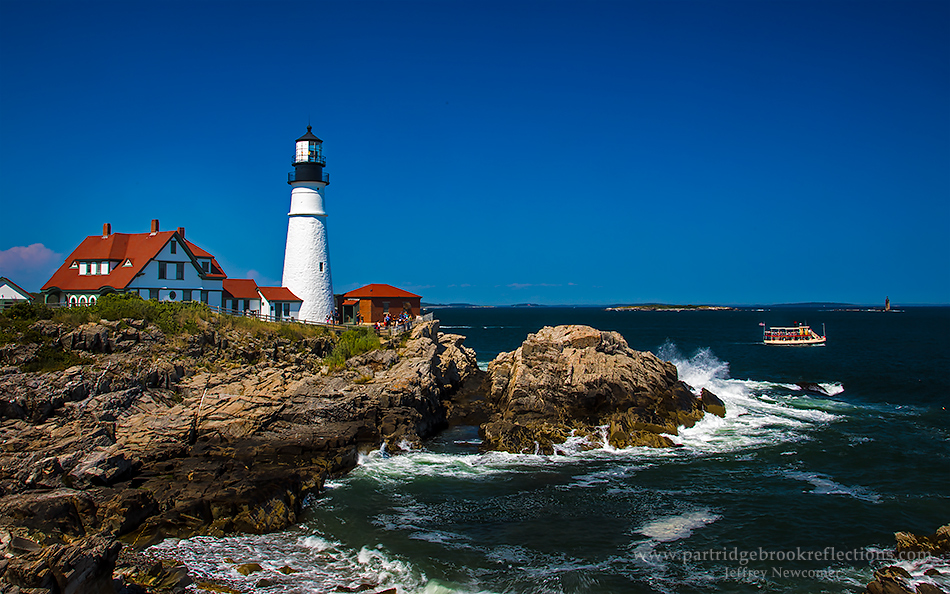

Portland Head Light
Living in the landlocked center of New England I enjoy every opportunity to get back to the coast.  The rocky shores, the beaches, the quaint villages and of course the proud lighthouses all offer photographic choices that are very different from what I enjoy around home.  I love the “Currier and Ives” beauty of my Monadnock regions, but it is refreshing to be surrounded by different opportunities to challenge my eye. 

It isn’t surprising that, returning from 5 days on the coast, I have much work to do on the images.  I will be sharing more of my favorites in future articles, but today I want to ask a simple question that arose as I uploaded my images.  Why do I take so many pictures?


It took me a couple of days to upload my images from my coastal tour.
Floral Shore, Ogunquit, Me
Five Image HDR
 Over five days, I shot over 500 pictures which, at more than 20 megabits each, means that I had more than 10 billion pixels to manage.  I wanted to briefly discuss why it is that I took so many pictures on this, and actually ALL of my shoots.  Is it justified or just a manifestation of the classic “Spray and Pray” approach to photography. I would like to think that there are many good reasons to come home with piles of images.   Given the cheapness of pixels and the availability of inexpensive options for their storage, failure to capture all the images that are necessary is a disservice to the subjects

Spray and Pray

Change to "Spray and Pray"

For many casual photographers, digital imaging has encouraged the tendency to shoot randomly, without careful attention to light or composition. This “Spray and Pray” approach assumes that among the hundreds of images a few will come out ok.  After all, its only pixels and all the trash can just be deleted.   The problem is that this technique removes the photographer from the process and without creative input it is impossible to craft the best images.  If I wish to argue that's I am NOT a spray and prayer, I must suggest a few other reason to shoot mountains of pictures.

----------------------------------------------------------------------------------------

Different Angles and Compositions
Dummerston Covered Bridge
Perhaps the most obvious reason to capture lots of images is the need to “work the scene”, to explore as many different angles as possible.  I never feel that I have done my job until I have gone beyond the pretty picture postcard view and have explored the subject from different angles and perspectives. I typically start wide and then steadily move in on the detail.  Not every angle works, but I keep them all, because you just never know.


                     -------------------------------------------------------------
Nailing the Exposure, Bracketing, HDR
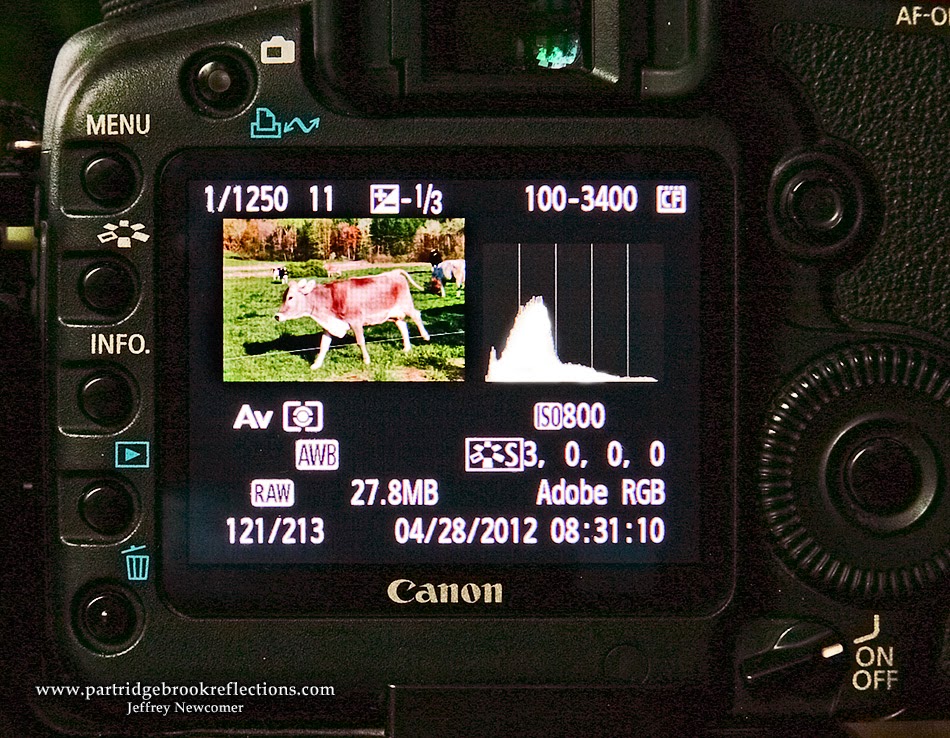
Back in my film days, I routinely bracketed my exposures.  Transparency film is famously unforgiving and I almost always grabbed one image above and one below the metered exposure.  Today, with the instant feedback of the Histogram, it is much easier to nail the exposure.  I still may take several images until I get my “perfect” histo, and I admit that I am not as rigorous as I should be in deleting the trial images – You never know.  


      HDR

This leads to a discussion of the collection of multiple, varyingly exposed, images gathered in anticipation of crafting an HDR picture.  This can require 5, 7 or more images, or just two, one exposed for the shadows and another for the highlights. It is somewhat like my old film bracketing, and on occasion, I will find one among the series that has sufficient dynamic range to be used on its own.  Of course, that doesn’t mean that I will throw the others away – You never know.

Hubner Farm, HDR and Tone-Mapped


                     -------------------------------------------------------------
Focus Stacking
Three Layer Focus Stack
Given the exposure control offered by digital photography, most of my current bracketing is based on obtaining a range of focus points.  I originally referred to this as “Focus Bracketing”, until I discovered that everyone else was calling it “Focus Stacking”.  “Stacking” refers to the ability to achieve impossibly wide depth of field by stacking together image layers with different focus points.  


Perkins Pond to Monadnock - Deep DOF


I often use focus stacking in situations in which extreme DOF is the goal. For almost all of the rest of my Images, I routinely grab at least three pictures, focusing on the foreground, mid-ground and background.  Again, I often find one of the images that captures sufficiently sharp focus throughout, but of course I keep the other images- You never know. 


                     -------------------------------------------------------------


Capturing the Moment
Any time, when the scene is changing, multiple images can be important for catching the perfect moment.  Running animals, flying birds, and racing athletes, are why your camera’s burst mode was created. 


Blue Heron Landing - Just the right moment


Last weekend, I was reminded of another use for bursts of images, the capturing of the waves.  Several years ago, I placed myself on a precarious

Best of the 70

outcropping to shoot the waves crashing on the rocks of Pemaquid Light.  It is never possible to reliably predict the moment of the most dramatic waves. By the time you see the perfect crashing wave, it is already too late to capture the event. The best that can be done is to shoot bursts of what seem to the most promising candidates. Before I was forced to run from the rising tide, I shot more than 70 pictures, to catch just two that were “heroic keepers”.  That is atypical ratio.  I should have thrown the others away, but you never know.


Pemiquid Crash


Bob's Floating Head
Finally, when taking group pictures, I always take multiple images.  There is always at least one person in every group shot who is talking, yawning or picking their nose.  As I click away, I ask the crowd to stay still, and then I can usually find an acceptable picture of the nose picker to clone into the final image. 

                     -------------------------------------------------------------

Getting a Steady Shot
Katy's Almost Perfect Technique
I go through a careful checklist of procedures to try to capture perfectly sharp images.  Equally important to sharp focus, is the requirement to hold the camera steady.  This is especially important when trying to handhold shots with longer shutter speeds.  My hand-holding technique includes the positioning of my body, cradling of the camera and a careful finger roll shutter release but still the pressing of the shutter button can introduce a slight vibration.  


Finger Roll Shutter Release
To help with this I tend to take a burst of at least two images on each shutter press. I’m not sure how much it helps. Sometimes the first image is the sharpest, but it makes me feel better, and I never - ever know. Obviously, this is not an issue with a cable release on a tripod, but I still have to remember to turn off the image stabilization feature.


                     -------------------------------------------------------------

The Picture Glut Equation (With acknowledgement to the Drake Equation)

Bug Light, Portland Maine

Ok, that is just a partial list of my excuses for bringing home so many images.  I am sure there are others.  Of course, many of these excuses can apply to the same scene progressively multiplying the pixel pile.  The Bug Lighthouse picture required about 90 images, including several for focus stacking of the lighthouse and rocks, many to obtain the best waves, and several to capture the ferry in the best location.


My picture glut formula may be loosely expressed as:


Number of Pictures = (Different angles) x (Exposure Searching) x (Focus Stacking) x (Action Bursting) x (Steadying Hand-Holding Bursts)

Of course, not every scene requires all of these factors, but let's put in some conservative, but totally reasonable numbers for an imaginary landscape scene:

(5 angles) x (6 exposures) x (3 focus points) x (0:no action here) x (2 hand steadying) = 180 images for one location 

It is amazing that I came home from the coast with so few images.  The point is that digital photography makes it practical to use as many images as is necessary to render the best representation of the scene.  Although they both involve taking many pictures, this careful, deliberate process could not be further from the careless, random approach of "Spray and Pray". 

Now if I can only force myself to get rid of some of those extra shots!
BUT, You just never know!

Jeffrey Newcomer

Sunday, May 13, 2012

Exposing to the Right

Old Stone Bridge, Ashuelot River, Keene New Hampshire

Getting Exposure Right in the Digital Camera

Last week I began the discussion of exposure control in digital photography and more specifically about the use of the histogram to nail the optimal exposure every time. Much of that discussion focused on the importance of adjusting exposure to avoid the extremes. To avoid overexposure, positioning the histogram against the right side and clipping the highlights or underexposure, pushing the histogram against the left side and loosing detail in the shadows, but there is more to optimal exposure than avoiding the extremes.


Technically if the histogram is safely enclosed within the graph without piling up on the right or left then you might expect that the  Goldilocks Rule would apply, since it is neither too bright or too dark and all tonal levels are recorded. But unlike Goldilocks, every position within the graph is not “just right”. It is here that the “Expose To The Right” (ETTR) rule applies.


ETTR
Exposing to the right is an approach designed to get the most from the digital sensor in terms of tonal range, noise reduction and color quality. In practice it means slightly overexposing images, shifting the histogram to the right where digital light sensors work more efficiently.

The Physics

Digital image sensors are linear devices that translate the incident light into an electrical signal which is directly proportional to the intensity of the light. The greater the light, the greater is the portion of the sensor's tonal range that is dedicated to that part of the image.
Low Contrast : Histogram in the Middle
But f stops are not linear, but logarithmic. Every time you drop by one stop you are cutting the light in half and, remarkably, what this means is that the brightest stop on a digital sensor uses one half of the total tonal information. The next stop down gets only one half of what is left and so on until the darkest tones are recorded with a much smaller amount of tonal information. The result is that dark regions are much more susceptible to noise, loss of detail, and posterization in post processing. Digital sensor noise is actually higher in the bright tones, but since there is so much more information (signal) at this end of the range, the high signal to noise ratio (S/N ratio) obscures any noise. Noise can be significantly more intrusive at the dark end of the range, where the smaller signal is susceptible to being overpowered by the noise.

Anytime I start talking about the interaction between linear and

Exposure Right Shifted, ETTR, Not Pretty
logarithmic scales, I know I am in trouble, so let's get to the simple, practical application. Since there is more tonal information available at the bright (right) end of the scale, by increasing the exposure, the darker regions are moved into a portion of the scale that can better record detail with a more favorable S/N ratio. Again the resulting image on the LCD will not be the most attractive, but it will give you the highest quality information to take home to your editing software. This is a real test of your ability to trust the histogram and I have struggled to avoid the natural tendency to "improve" the resulting overbright, washed out image by lowering the exposure to get the prettiest LCD rendering.

An Example


Left Shifted Exposure
Exposed toward Right


As an example, here are two exposures taken of the classic old stone bridge in Keene New Hampshire. The first was underexposed, but looked better on the LCD screen. The dark tones are recorded on the far left of the histogram. The second was "exposed to the right", appearing overexposed and washed out on the screen, but the histogram showed that the dark tones were shifted to the right, on a more favorable portion of the scale, and that the highlights were not clipped. The two images looked very different on the LCD screen, but I then processed each in Camera Raw and Photoshop to get the best results. The two images were adjusted to look grossly the same, but examination of the detail, especially in the shadows, shows that the brighter image has smoother tonal range and less noise. ETTR does work!


Detail Comparis


A Few Caveats for ETTR:

First, to get the tonal benefits from ETTR, images must be shot in RAW, with the proper brightness brought back in the RAW converter. In addition to having a much smaller native tonal range (only 256 at 8 bits), JPG images are processed in camera. Their tonal range is "baked in" before the picture ever reaches the computer, leaving little margin for salvaging the over exposed images.

Secondly , as you increase the exposure it is important to avoid going too far, clipping or blowing out the important highlight tones. As I discussed last week, you must trust the histogram and avoid piling up against the right side. Most cameras have an additional visual aid to help avoid clipping. The "blinkys", the flashing lights on the LCD image are there to identify areas of blown highlights. Annoying but very helpful.

Finally, although ETTR has become the conventional wisdom for digital exposure, there is still some controversy about it's value. No surprise, we are photographers, we must debate! Digital sensors are constantly changing and improving. Only experimentation will tell you how valuable this technique will be for you.

So give ETTR a try. The biggest hurtle is to get over the strong desire to make the LCD image look it's best, but here again, in the digital world, getting it right IN the camera means something different than getting it looking it's best directly FROM the camera.


Check out Part One of Getting Exposure Right in the Digital Camera

Monday, May 7, 2012

Using the Histogram

Getting Exposure Right in the Digital Camera


A while ago, someone asked me how to get rid of the little graph 
that kept showing up on her camera's LCD screen. I could only assume that she was trying to make it go away so she could see the full size, unobstructed picture of her drunken uncle with the lamp shade on his head? Although I am confident most of my audience understands the value of the histogram, this article is for those who are still trying to figure out how to make it go away - DON'T. In a future article, I will be getting more technical, but this week I would like to show how a simple understanding of the basics can make a world of difference in your control of exposure. Anyway, that little graph is called a histogram and it is the essential key to unlocking optimal exposure, every time.

This week, to continue my series on "Getting It Right In The Digital Camera", I will begin a discussion about getting exposure right in the digital camera. So far I have discussed the control of focus and of perspective, but for me, the improvement in my ability to control exposure has been the most significant benefit of my change from film to digital photography. With film it took great care to assure a properly exposed image and even with the help of light metering and bracketing, I still couldn't be sure that I nailed it until the pictures came back from the lab or were revealed in the development tray. Now it all comes down to the histogram, and with the use of this marvelous tool there is no excuse for a poorly exposed image. If you want to take a bad picture you must simply find another way to do it.

Find the Histogram
The LCD image on the back of essentially all digital camera can be
very useful. It is helpful for a rough review of composition, and an even rougher assessment of focus, but it is should not be relied upon for exposure monitoring. The best exposure is often not the one that looks best on the screen. The brightness of the LCD image is affected by the JPG rendering that is done in camera and also on the brightness you have set for the LCD screen itself. The primary reason I look at the LCD is to evaluate the exposure from the histogram. The histogram is simply a visual representation of the range of brightness in your images. Brightness varies from the blackest black on the left to the whitest white on the right. If you are shooting 8 bit jpg images, that brightness range is divided into 256 steps. In RAW at 14 bit the dynamic range is divided up into over 14,000 steps – you should be shooting in RAW. Regardless of the bit depth, at every point on the graph the height of the column is proportional to the number pixels at that level of brightness. 


Study the Histograms


 The best way to understanding what the histogram is showing is to study the graphs for a range of images.   In the wildflower photograph, the histogram shows a full dynamic range with a bias toward darker tones (to the left). 
The histogram for the winter picture of the hill-top Oak at Alyson's Orchard, is shifted to the right by the preponderance of bright tones.  The slight tail extending to the far right represents the brightness of the moon whereas the few deep shadows in the tree explain the tail to the left. In a photograph dominated by a bright sunny beach the histogram columns will be shifted far to the right, while a dark, shady forest will be represented by columns bunched over to the left side. An extreme example is seen in the silhouette image of a Frigate on the Galapagos Islands.  Here there is only bright light and deep shadow and the histogram shows the two peaks at opposite ends of the dynamic range.


The histogram of a low contrast image will float in the middle of the graph without extreme whites or blacks. How to best position this truncated graph is a discussion for another time, but think "expose to the right".


Control Exposure with the Histogram
Every image will have its own distinct natural pattern, but in digital photography the goal should be to capture the range of brightness that will provide your editing program with the information it needs to show quality detail throughout your desired dynamic range.  There is no "ideal" histogram. The best exposure, and therefore the best histogram, depends on the dynamic range of the subject and the artistic goals of the photographer.

 My routine approach is to lock down my initial settings in aperture or shutter priority, depending on whether depth of field or shutter speed is most important. I don't worry a great deal about other setting until I have taken my first image. That first picture is primarily for metering the scene. Once I have seen where the graph lies I will have a good sense of how the final exposure will need to be approached


Avoid Clipping
 It is most important to check the general position of the graph. To assure that there is no significant loss of detail in the brightest highlights of the image or in the shadows.


If the histogram is shifted too
Right Shifted
far to the right with data piling up against the far side of the graph, the brightest areas of your image will be blown out or "clipped".  There will be no salvageable detail in these regions, and there is nothing that even the most magical editing program can do to bring this back. You will need to reduce exposure to shift the graph to the left.

Highlights Recovered

There will be times when it is ok to blow out the extreme highlights, when it is not necessary to find detail in some highlight areas. The classic example is when specular reflections are recorded, such as bursts of sunlight reflecting off a chrome automobile fender or sparkling light on ocean breakers. In these situations as well, the histogram is essential to controlling the results.  The sunflower picture has a spike at the far right of the histogram, but these "blown" highlights are in the direct sun where no detail is expected or possible.


Sun Clipping

Excessively dark images
Left Shifted Histogram
will be shifted to the opposite side of the histogram, with the columns piling up against the left side. Lost shadow detail can often be retrieved in post processing, but the results are usually excessively noisy with a muddy appearance. Here again the shadow detail can be preserved by increasing exposure, shifting the graph to the right. As with the highlights, there are times when extremely dark areas can help to provide contrast in an image.
 
Shadow Detail Recovered

When dynamic range is high, it may not be possible to protect both highlights and shadows and compromises need to be made. Using the histogram, I will often increase exposure until important highlights begin to be compromised and then back off slightly. This is called "exposing to the right" and although it often does not yield the prettiest picture on the LCD, there are good reasons why, 
regardless of the dynamic range, this is usually the optimal approach to positioning the histogram .  But I will reserve that discussion is for another time.

For now, get into the habit of reviewing your histograms. Understand what they represent and then use this to get all the exposure data you will need to fulfill your vision of the scene.  Your drunken uncle probably will appreciate having his indiscretion obscured by the graph and you will get a perfectly exposed record of the event. 


Check out Part Two of Getting Exposure Right in the Digital Camera: Exposing to the Right